If you’re working with Kubernetes, you’ve probably noticed that Pods come and go, and their IP addresses keep changing. That’s where Services come in. They give you a stable way to keep your apps accessible and reliable. But picking the right type between ClusterIP, NodePort, and LoadBalancer? That can get confusing fast.
Why pods need a Service in front of them
Pods are temporary. They get created and destroyed, and their IPs change with them. Without a Service, one deployment’s rollout breaks every caller that had cached an IP. Pick the wrong Service type and you either expose something internal to the internet or make your app unreachable, and both of those are worse to debug in production than to think about now.
What the choice affects
The Service type decides who can reach your workload and what it costs to run. It also decides how much of your cluster’s edge you have to think about, which is why the default is the conservative one.
The three types
Kubernetes gives you three main Service types. Each one solves a different problem.
ClusterIP: internal traffic
How ClusterIP works
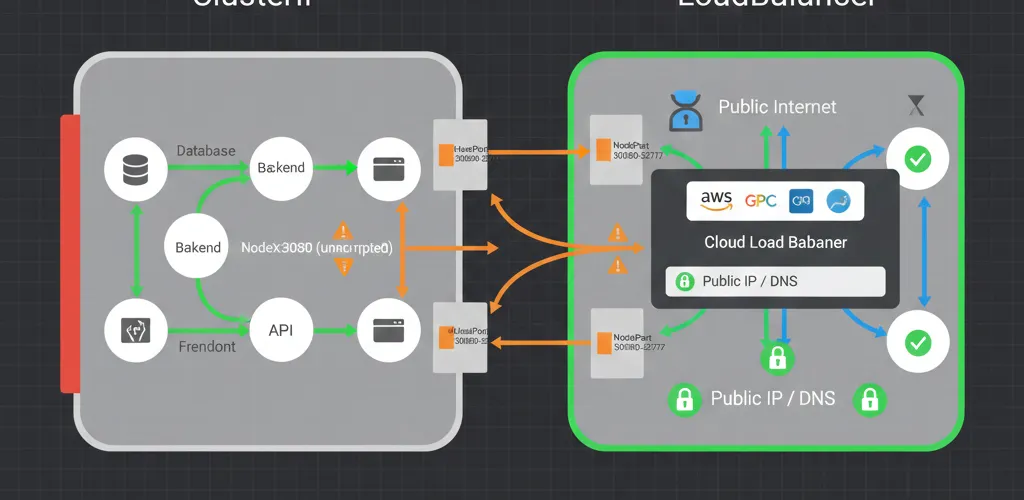
ClusterIP is the one you’ll use most. It creates a stable virtual IP and DNS name inside the cluster that only other pods can reach. Backend services, databases, internal APIs: anything that has no business being reachable from outside. It’s the default type, and leaving it as the default is usually the right answer.
When to use it
Backend services, databases, internal APIs and service-to-service calls inside the cluster. If nothing outside the cluster needs to connect, this is your type.
ClusterIP configuration
Here’s what a basic ClusterIP Service looks like:
apiVersion: v1kind: Servicemetadata: name: backend-servicespec: type: ClusterIP # This is actually optional since it's the default selector: app: backend ports: - port: 8080 # Port the Service listens on targetPort: 3000 # Port your Pod listens onNodePort: development and testing
How NodePort works
NodePort opens the same port (somewhere between 30000 and 32767) on every node in the cluster. Hit any node’s IP on that port and kube-proxy forwards you to a pod, wherever it happens to be running. It takes one line of YAML, which is exactly why it’s the right tool for development.
What it’s good for
Quick external access in a dev cluster, without provisioning anything from your cloud provider or setting up an ingress controller.
Where it falls down
You’re opening a port on every node, your clients need to know node IPs, and there’s no health check in front of them. Nodes get replaced, and the IP your teammate bookmarked stops existing. Fine for testing, not something to hand to users.
NodePort example
Here’s a NodePort example:
apiVersion: v1kind: Servicemetadata: name: test-servicespec: type: NodePort selector: app: webapp ports: - port: 8080 targetPort: 3000 nodePort: 30080 # Optional - K8s will assign one if you don't specifyNow you can access your app at http://<any-node-ip>:30080.
LoadBalancer: production external access
How LoadBalancer works
LoadBalancer is the production answer. Kubernetes asks your cloud provider for a real load balancer (AWS ELB, GCP Load Balancer, Azure Load Balancer) and gives you a public IP for it. Traffic spreads across healthy pods, and an unhealthy node drops out of rotation on its own.
Cloud provider integration
The cloud controller does the provisioning, so a type: LoadBalancer Service turns into an actual load balancer with a few lines of YAML and no console clicking.
What production gets from it
Health checks, failover when a node dies, and a stable IP you can point DNS at. The catch is that each LoadBalancer Service is a separate billed load balancer, which is why teams with many public services end up putting an ingress controller behind a single one instead.
LoadBalancer configuration
Here’s how to set one up:
apiVersion: v1kind: Servicemetadata: name: frontend-servicespec: type: LoadBalancer selector: app: frontend ports: - port: 80 # External port targetPort: 8080 # Container portOnce it’s deployed, Kubernetes talks to your cloud provider and sets everything up. You’ll get an external IP that you can use in DNS records or share with users.
Comparing the three
They stack on each other
- Use ClusterIP for internal services like databases, backend APIs, and microservice-to-microservice communication.
- NodePort is handy for quick testing and development work.
- LoadBalancer is what you need for production apps that face the internet.
- These Service types actually build on each other. A LoadBalancer creates a NodePort, which creates a ClusterIP underneath.
Choosing one
Start from who needs to reach the workload. Nothing outside the cluster? ClusterIP. A teammate needs to poke at it this afternoon? NodePort. Real users on the internet? LoadBalancer, or an ingress controller sitting behind one.
Moving between types
Changing type is an edit to one field, and because the types nest, going from ClusterIP to LoadBalancer keeps the same in-cluster DNS name working. Going the other way removes the public IP, so anything pointing at it needs to move first.
Why the choice matters
Security
ClusterIP keeps internal traffic internal, and that is the whole security argument. Every time you promote a Service to NodePort or LoadBalancer, you’re adding a door, so the question worth asking is whether that workload needed one.
Performance and scaling
A LoadBalancer distributes traffic and drops unhealthy backends. NodePort sends everything to whichever node the client picked, and if that node is busy, that’s the client’s problem.
Running it day to day
A cloud load balancer gives you metrics and health checks you’d otherwise build. NodePort gives you a port number to remember and nothing else.
What’s your Kubernetes service strategy?
Community approaches
How are you exposing services in your Kubernetes clusters? Got any tips for managing external access?
Beyond Services
Most teams past a few public endpoints move to an ingress controller or a service mesh, and I’d like to hear where you drew that line and whether the mesh was worth its operational cost.